Table of Contents
Introduction
Choosing the size of cable tray is a critical decision for engineers, electricians, and project managers in industrial and commercial installations. Selecting the wrong dimensions can lead to overcrowded cables, overheating, safety hazards, and increased maintenance costs. Many professionals are unsure how to balance current cable loads with future expansion needs, or how to account for cable types, environmental factors, and regulatory compliance.
This comprehensive guide covers standard sizes, key selection factors, installation tips, practical examples, and troubleshooting advice. By the end, you will have the knowledge to confidently select the ideal cable tray for any project, ensuring safety, efficiency, and long-term reliability.
Understanding Standard Cable Tray Sizes
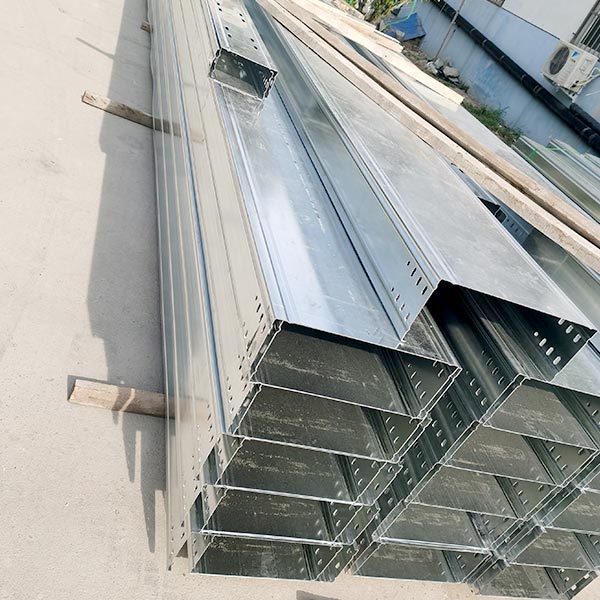
Cable trays come in a variety of widths, depths, and lengths to accommodate different cable types and installation environments. Correct sizing ensures adequate cable spacing, proper airflow, and future scalability.
Common widths typically range from 50 mm (2 inches) to 600 mm (24 inches), while standard depths range from 25 mm (1 inch) to 150 mm (6 inches). Selecting an appropriate width ensures enough space for cables and allows air circulation to prevent overheating. For example, a small bundle of 10 cables with 10 mm diameter may only require a 150 mm wide tray, while 50 cables with 15 mm diameter may require a 600 mm heavy-duty tray. Using a cable fill chart is strongly recommended to ensure proper spacing.
Cable trays are usually supplied in 3-meter (10-foot) sections, but modular and custom lengths are available for unique installation layouts. Modular sections allow flexibility, easier installation, and simplified maintenance. Installing trays in standard lengths reduces waste and cost but can be customized for bends, offsets, and irregular pathways. Internal linking to relevant product pages such as Heavy-Duty Cable Trays or Aluminum Cable Trays, can provide users with direct access to specifications and pricing.
Factors Affecting Cable Tray Size Selection
The total number of cables and their diameters dictate the tray width. Overcrowding can compromise airflow, increase temperature, and cause premature cable degradation. Using a cable fill chart ensures safe installation and compliance with industry standards.
Different cable types require specific considerations. Power cables generate heat and require larger spacing, fiber optic cables are sensitive and require gentle bends and separation from high-voltage cables, and control cables need moderate spacing to avoid electromagnetic interference.
Environmental factors strongly influence tray size and material selection. Outdoor or industrial settings may require galvanized or powder-coated trays for corrosion resistance. Areas with chemicals, moisture, or high temperatures require additional protective coatings or stainless steel options.
Planning for future cable additions is essential for long-term project efficiency. Oversizing trays slightly allows room for additional cables, minimizing the need for replacements or secondary installations. A good rule of thumb is to leave at least 20–30% extra space for growth, especially in industrial projects where future automation or instrumentation upgrades are common.
Standard vs Custom Cable Tray Sizes
Standard tray sizes are suitable for most industrial and commercial installations. They are cost-effective, widely available, and designed to accommodate common cable bundles. Standard sizes are easier to source, reducing lead times for projects.
Custom trays are often required for complex layouts, high cable loads, or special architectural constraints. Advantages include optimized space utilization, compliance with specific safety codes, reduced installation complexity for irregular paths, and flexibility for heavy-duty or large-scale projects. Internal linking to Custom-Hole Perforated Cable Tray pages can provide further guidance for engineers seeking tailored solutions.
Cable Tray Fill Table
Below is an example table showing recommended tray widths based on cable count and diameter:
| Number of Cables | Cable Diameter | Recommended Tray Width | Notes |
|---|---|---|---|
| 10 | 10 mm | 150 mm | Small bundle, standard spacing |
| 20 | 10 mm | 250 mm | Allow airflow, use divider |
| 30 | 12 mm | 400 mm | Heavy load, check support spacing |
| 50 | 15 mm | 600 mm | High load, heavy-duty tray recommended |
| 70 | 20 mm | 800 mm | Custom tray recommended, heavy-duty |
This table helps engineers quickly determine tray dimensions and plan installations efficiently. It also serves as a reference for estimating costs and material requirements.

Best Practices for Efficient Cable Tray Installation
Calculate total cable load by including both weight and quantity of cables. Leave sufficient space for airflow to prevent overheating. Use compatible accessories such as brackets, bends, and supports that match tray dimensions. Always follow IEC, NEC, or local standards for safety compliance. Label cables clearly to facilitate maintenance and troubleshooting. Plan tray paths carefully to minimize bends and obstacles, which simplifies installation. Check for corrosion and choose materials appropriate for the environment, such as galvanized, powder-coated, or stainless steel. Document layouts with CAD diagrams to aid future maintenance. Including diagrams showing proper cable spacing, airflow, and support placement improves usability.
Common Mistakes to Avoid
Oversizing or undersizing trays leads to wasted space or overcrowding. Ignoring environmental factors can cause corrosion or heat damage. Mixing incompatible cable types may lead to interference or operational failures. Skipping expansion planning can result in expensive retrofits. Always verify your tray installation with a simulation tool or CAD layout before purchase to avoid these issues.
FAQ
How do I calculate the fill percentage for a cable tray?
Use a cable fill chart based on cable diameters and quantity. Maximum fill should generally not exceed 60% to ensure safe airflow.
Can I mix different cable types in a single tray?
Yes, but heat-generating cables should be spaced properly to avoid affecting sensitive cables such as fiber optics.
Are custom trays worth the cost?
For irregular layouts or high-load installations, custom trays improve efficiency, compliance, and reduce future maintenance.
What materials are recommended for outdoor cable trays?
Galvanized steel, powder-coated steel, and stainless steel are recommended for corrosion resistance in harsh environments.
How do I plan for future expansion?
Leave at least 20–30% extra tray space, and consider modular sections that can easily accommodate additional cables.
Case Study Example
An industrial power plant installation faced overcrowding of power and control cables, leading to overheating. The solution was to install 400 mm and 600 mm heavy-duty modular cable trays, along with proper supports and spacing. This approach improved airflow, simplified maintenance, and reduced downtime. The case illustrates the importance of proper tray sizing, planning for expansion, and choosing appropriate materials.
Conclusion
Selecting the correct size of cable tray is essential for safe, efficient, and future-proof cable management. Factors to consider include cable type, quantity, installation environment, and potential growth. Following best practices ensures long-term reliability, regulatory compliance, and reduced maintenance costs.
Need help selecting the perfect cable tray for your project? Contact our experts today or subscribe to our blog for more industrial cable management tips.